Blog
A Practical Guide: Automating Passkey Testing with Playwright and Authgear
Joyz Ng 3 min read
Passkeys (WebAuthn) offer a secure, passwordless future for web logins, but testing them presents unique challenges. This practical guide walks you through automating Passkey testing using Playwright and CDP features, and how you can quickly build an app to support Passkeys login with Authgear.
What is WebAuthn?
WebAuthn (short for Web Authentication) is a web standard that lets users log in securely without passwords.
Instead of typing a password:
- You use your fingerprint, FaceID, or device PIN.
- It is safer (no password to steal) and easier for users.
- WebAuthn is the technology behind Passkeys.
In short:
- No passwords
- Use device security (fingerprint, face, PIN)
- Safer and faster login
What is a Passkey?
A Passkey is a login credential based on WebAuthn. It is stored securely on your device, and you can use it to log in by just unlocking your device (no typing).
Apple, Google, Microsoft, and others support Passkeys.
Passkeys work across devices (phone → computer, etc.)
Passkey = WebAuthn credential that syncs across your devices
What is a CDP Session?
CDP = Chrome DevTools Protocol
It lets Playwright talk directly to Chrome like a developer tool would:
- Simulate fake devices
- Control authentication prompts
- Do deeper testing
When testing Passkeys, we use a CDP session to create a fake Passkey device so we don’t need real hardware.
Build with Authgear: One-Click Passkey Activation
With Authgear (which provides Free Plan!), you can quickly spin up an app with passkey authentication in minutes:
- Create a basic app using v0, Lovable, Bolt, or other UI builders
- Enable passkeys with one click in your Authgear admin portal
- Integrate their SDK with minimal code
- Add their pre-built authentication components
The platform handles all complex WebAuthn protocols and cryptography behind the scenes, giving you a complete passkey authentication system to test with no specialized knowledge required.
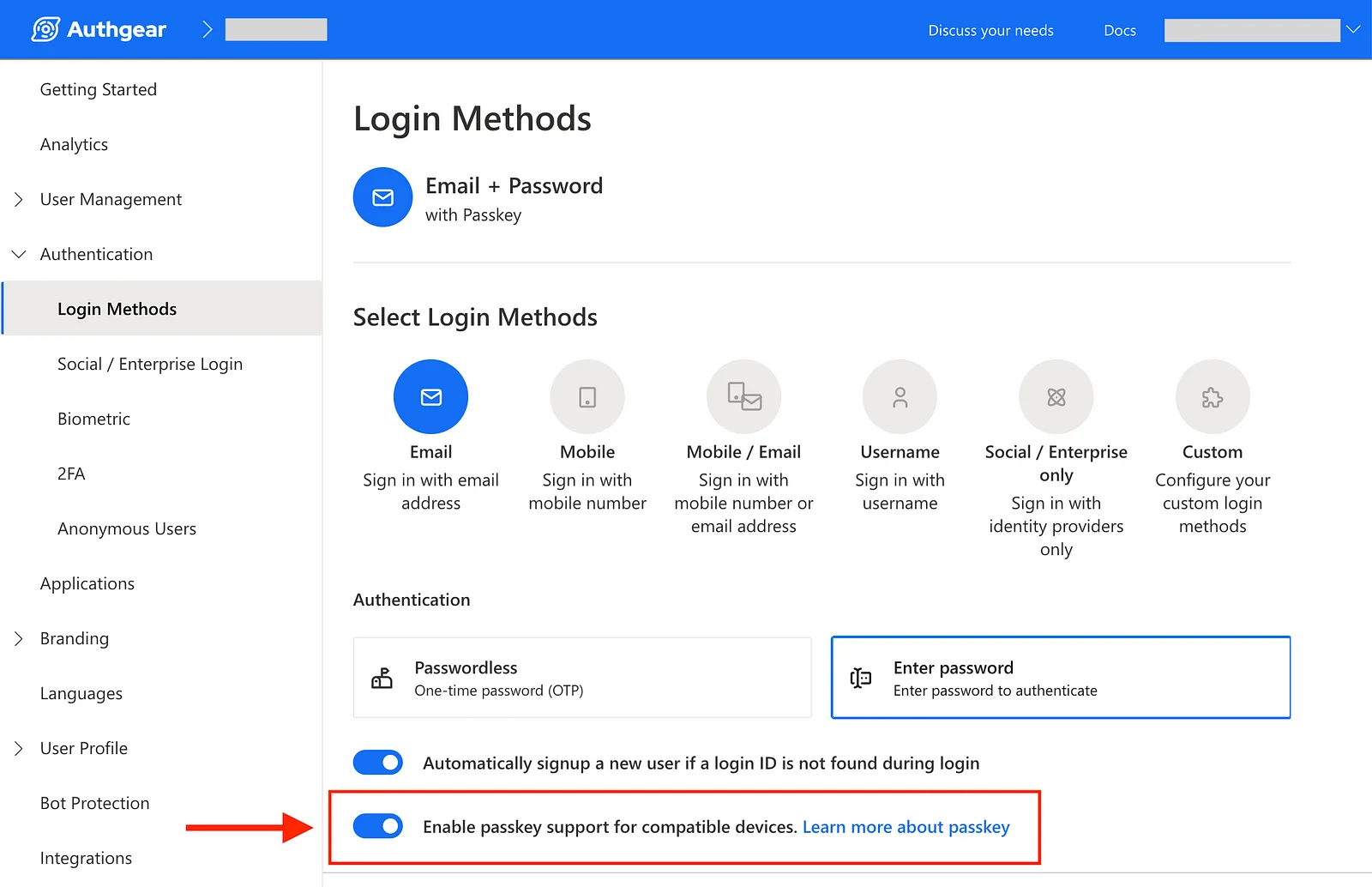
Set Up Passkey on Authgear by One-Click
Use Playwright to Test Passkey Login (Step-by-Step)
Now that you have an app ready (thanks to Authgear), let’s start testing!
Step 1: Install Playwright (if you haven’t yet)
Follow the instructions on Playwright official site to install and setup the automated test project:
npm init playwright@latest
Step 2: Create a WebAuthn Helper Class
Create a script called webauthn-helper.ts to simulate a virtual passkey device in your Playwright tests:
This helper script uses mainly 3 CDP commands:
WebAuthn.addVirtualAuthenticator- Creates a virtual authenticator deviceWebAuthn.setUserVerified- Controls authentication approval stateWebAuthn.removeVirtualAuthenticator- Cleans up the virtual device
Setting automaticPresenceSimulation: true makes the virtual device auto-approve “touch” actions.
You can extend this with additional CDP / WebAuthn commands like:
WebAuthn.getCredentials- List stored credentialsWebAuthn.clearCredentials- Remove all stored credentialsWebAuthn.addCredential- Add a specific credential- Set
automaticPresenceSimulation: falsecombined withWebAuthn.setUserVerified(false)to test rejection flows
Step 3: Write a Test to Sign Up and Log In with a Passkey
Then you can write your Playwright test script and uses the WebAuthnHelper Class to simulate the Passkey Login.
Below is a sample test script user-login-passkey.spec.ts:
This test demonstrates a complete user journey:
- Creates a new user with random credentials
- Sets up a passkey for the account
- Logs out and then logs back in using the passkey instead of password
- Verifies the user identity is preserved between sessions
- Uses proper assertions to validate each step of the process
- Cleans up test resources afterwards
Quick Recap
Here’s the gist:
- Passkeys (WebAuthn): Secure, password-free logins
- Playwright + CDP: Automate testing by simulating passkey interactions
- Authgear: Easily add passkey support to your app
Combining these technologies you can get:
- Stronger Security: No more password risks
- Better UX: Faster, easier logins for users
- Faster Development: Easily implement passkeys with quick tools
- Reliable Testing: Safeguard your login flows work with automation
Get started with passkeys and automated testing to secure your app, improve user experience, and simplify your workflows 🚀